

Two failure modes account for most key finder returns, and neither one shows up in a photo of the sample: the unit will not pair, or it pairs and then refuses to ring. Both are cheap to catch at receiving and expensive to catch after the carton has been broken into single units and spread across twenty retail shelves. The buyer who signs off on a pallet without testing those two things is not buying a product, they are buying a complaint queue.
The published figures on this line are specific enough to test against. Bluetooth 4.0, an 80 ft no-barrier rating on the OKC349, a CR2032 coin cell, and shells that run from 5.8 mm thick up to the 42 x 41 x 12 mm, 10 g body of the OKC354. Every one of those numbers can be checked on a bench in under half an hour. What follows is the receiving routine for a mixed pallet, ordered so that each test separates a radio fault from a battery fault from a mould fault, using a phone, a coin cell and a stopwatch.
Pairing and Two-Way Search: The First Ten Minutes of a QC Batch
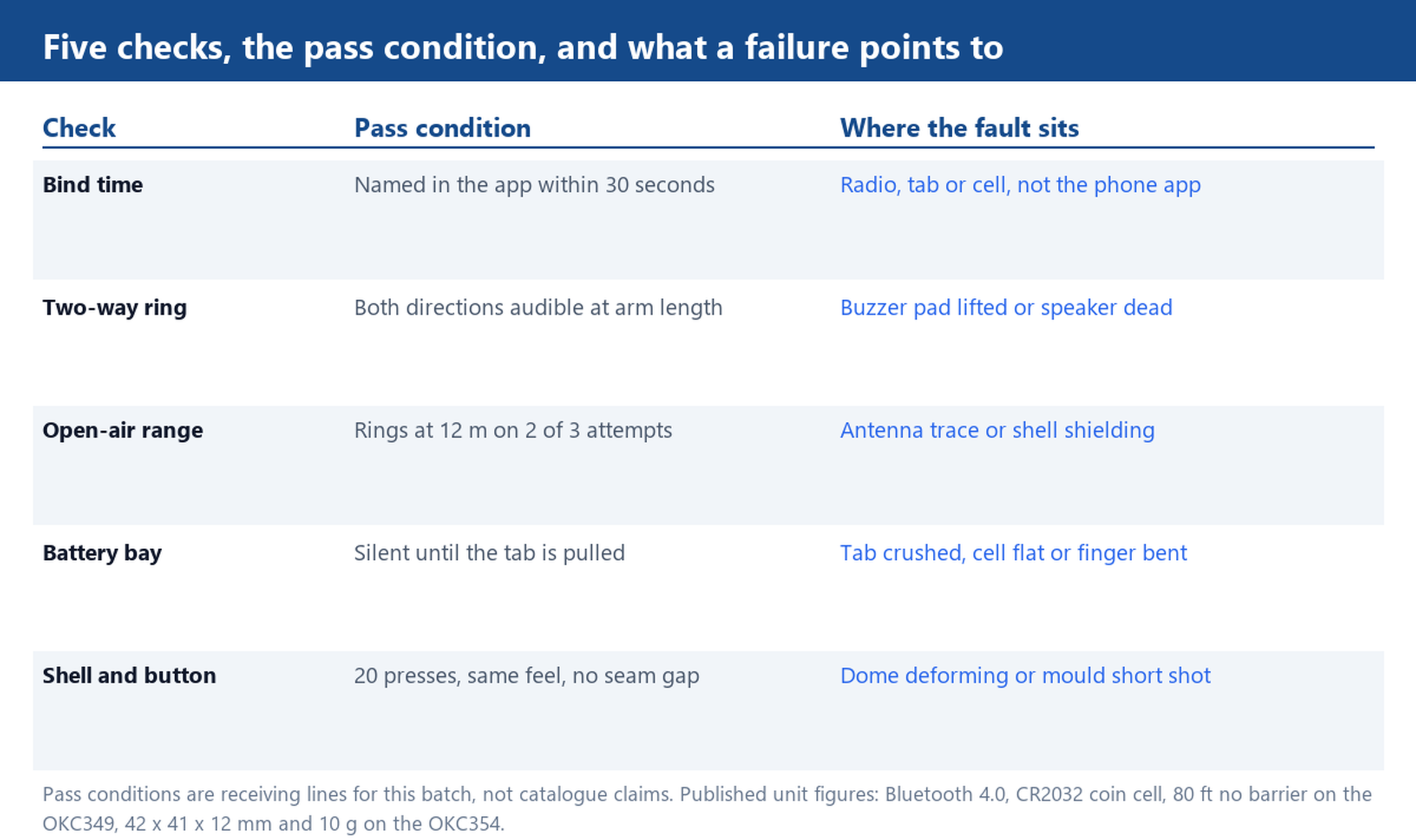
Start with pairing, because a unit that will not pair cannot be tested for anything else, and because pairing failures are the ones that get argued about later. Pull the insulation tab, wait for the unit to announce itself, open the app, and time the bind. Our working pass line is thirty seconds from app scan to a named device in the list. Anything slower than that on a first attempt gets a second attempt with a fresh cell, and if the second attempt also runs long, the unit comes out of the sample and the batch goes on hold.
Record which of the two pairing failures you saw, because they point in different directions. A phone that never lists the device is a radio or power problem: no advertising packet is being sent, which usually means the tab was crushed, the cell is flat, or the antenna trace is not connected. A phone that lists the device but cannot complete the bind is a firmware or app-version problem, and it will not be fixed by swapping cells. Keep those two columns separate on the sheet and the corrective action writes itself.
Then test the ring in both directions. Two-way search means the phone can ring the tag and the tag can ring the phone, and both directions fail independently. Ring the tag from two metres away with the volume on the phone at half, then trigger the return call from the tag and listen for the phone. A tag that rings is not proof that the return path works, and a return path that works is not proof the tag speaker is alive. Test both, every sampled unit, and listen at arm length rather than with the unit against your ear: the buzzer is small, and a partially seated diaphragm will still make noise when it is pressed to your skull.
The 25 m Rating and What Interior Walls Do to It
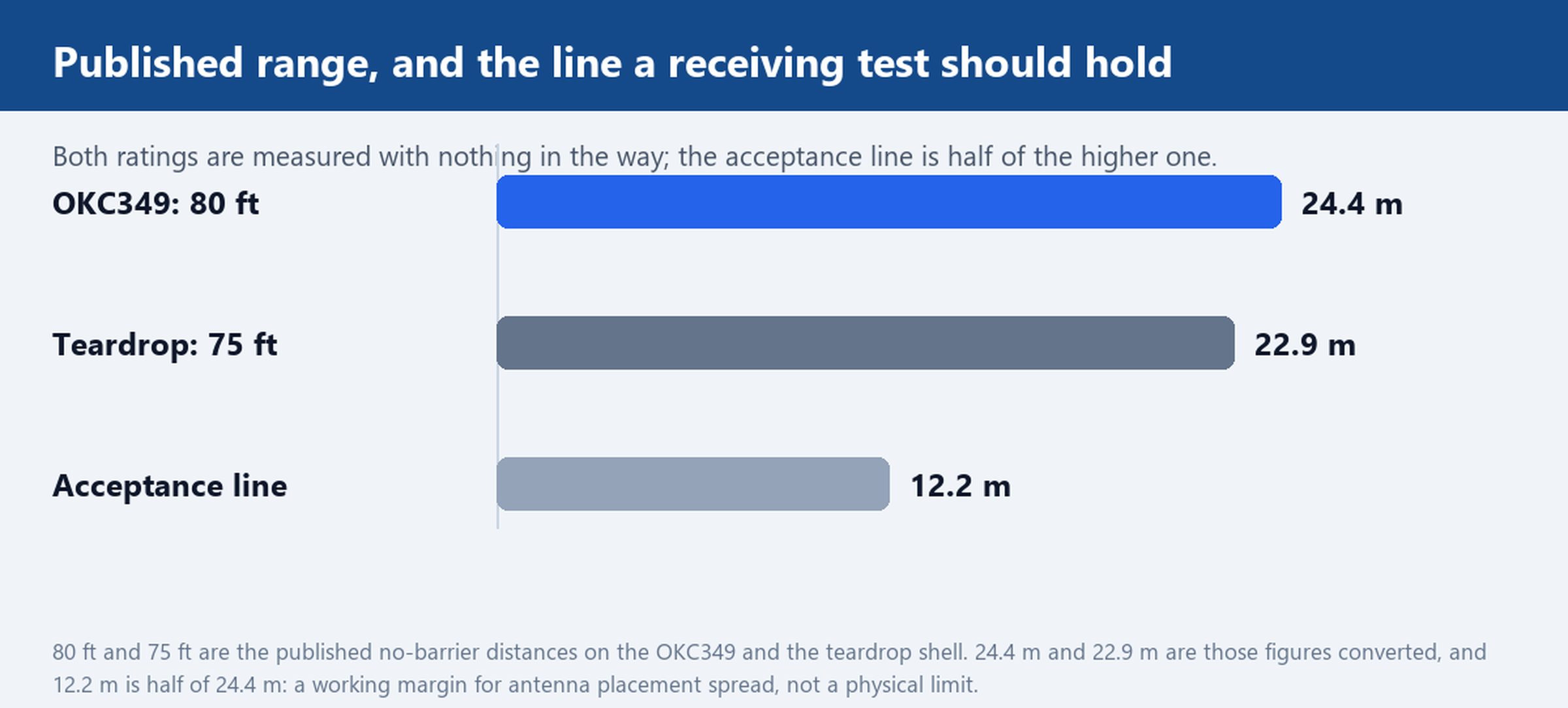
The 25 m in the title is the published 80 ft no-barrier figure rounded, and 80 ft works out to 24.4 m. That is a free-space number, measured with nothing between the phone and the tag, and it is the one distance claim that survives being put in a catalogue. It is not a promise about a flat with three rooms and a metal front door.
At 2.4 GHz the things that hurt range are the things that contain water or metal. A plasterboard partition costs little. A brick wall costs more. Reinforced concrete, a steel security door or a mirrored wardrobe will reflect the signal rather than pass it, and no amount of antenna tuning fixes a reflection. This is why a unit that rings across the length of an open warehouse can fail in a hallway with two closed doors, and why a receiving test run in a stockroom tells you almost nothing about how the product will behave in a customer home.
Set the acceptance line at half the rating, roughly 12 m, and run it on a clear corridor rather than through walls. Walk out in steps of about 5 m and ring at each step, three rings per step, and count a step as passed when two of the three land. Half of the rating is a working margin, not physics. It gives you a buffer for the batch-to-batch spread in antenna placement and for the phone at the other end, which is doing half the radio work and varies far more than the tag does.
CR2032 Bay, Insulation Tab and the Contact That Ships Dead
The CR2032 is a 3 V lithium coin cell, and the bay that holds it is where most dead-on-arrival units come from. Three separate faults live in that one small pocket, and they look identical to the buyer: nothing happens when the button is pressed.
First, the tab. A unit must arrive silent, with the insulation tab still between the cell and the contact. Pull one unit from the top of the carton and press the button before touching the tab. If it rings, the tab was crushed somewhere between the assembly line and the box, and the cell has been draining since it was packed. That is a battery-life complaint waiting to happen eight weeks later, not a cosmetic issue.
Second, the cell orientation. The positive face goes up against the marked contact on the lid in every model on this line, and a reversed cell in a sample is a strong signal that the fixture on the line allows the cell to drop in either way. Ask for the poka-yoke, not for a re-inspection.
Third, the spring contact. Take the cell out, look at the contact finger, and put the cell back. The finger should deflect and spring back flat. A finger that has been bent past its elastic limit sits low, makes contact only when the lid is pressed, and produces the worst kind of complaint: the unit works during inspection and fails in the customer hand. On a lid with a screw, check that the screw is not over-driven into the cell face. On a snap lid, check the two latch tabs for whitening, which is where the plastic starts to crack after the third battery change.
Shell Fit: Button Travel, the Lanyard Hole and the 5.8 mm to 12 mm Range
Shells on this line are not one product. The OKC349 is a 5.8 mm thick disc. The teardrop model is 43 x 27 x 7 mm. The OKC354 is 42 x 41 x 12 mm at 10 g, and the GPS Key Finder is 52 x 31 x 11 mm at 9 g in an ABS and silicone body. Each thickness carries its own failure pattern, so the tactile check has to be written per model rather than applied to the pallet as a whole.
On every one of them, press the button twenty times in a row and listen. The click should be the same on the first press and the twentieth, with a defined stop and a clean return. A button that goes soft in the middle of that run has a dome that is deforming, and it will stop registering long before the cell dies. Write down the press count at which the feel changed, if it changes.
Then look at the two stress points. The lanyard hole takes the whole load of a keyring, and a hole with a visible weld line or a sharp inner edge will crack at the rim within weeks of daily use. Flex the shell gently at the seam: a joint that opens under thumb pressure will separate in a pocket. On the thin 5.8 mm disc there is almost no material around the hole, so it is the model to check first and the model to reject fastest.
Finish with the seam. Run a thumbnail along the parting line. A mismatch you can feel is a mismatch the customer will photograph. The cosmetic threshold is your call, but it needs to be written down as a number and applied to the sealed sample, otherwise every carton will be argued about on a different standard.
Unpairing Before Shipment and the iOS and Android Note
A key finder that ships still bound to a test phone is a returned unit, because the buyer opens the app, sees a device they did not add, and concludes the product is second-hand. Unpairing is a production step, not a courtesy, and it belongs on the packing line rather than in the QC room.
The sequence that actually clears a bind: remove the device inside the app rather than deleting the app, switch the phone bluetooth off, power-cycle the tag by pulling and reseating the cell, then bring the phone back up and confirm the tag does not reconnect on its own. If it reappears in the list, the bind was cached and the removal did not take. Verify with a second phone that has never seen the tag, and pair there. That second phone is the proof that matters.
On the app side, expect the two platforms to behave differently in ways that get reported as product faults. Android has required location permission for bluetooth scanning since version 6, so a scan that finds nothing on an Android handset is often a permission that was never granted, not a dead tag. iOS handles background scanning differently and will drop a silent tag out of the list faster to save power. Both behaviours are normal. Put a one-line note in the box that says the app needs location permission on Android, and the support tickets drop without any change to the hardware.
What Goes on the Inspection Sheet
Knowing how to inspect key finder batches comes down to one page, because the sheet is what makes the test repeatable when someone else runs it next month. Five lines are enough, each with a pass condition written as a number rather than an adjective: bind time under thirty seconds, both ring directions audible at arm length, ring at 12 m on a clear corridor on two of three attempts, silent before the tab is pulled and live within three seconds after, twenty presses with no change in feel and no seam gap under thumb pressure.
Sample the units the way you would sample any small accessory, and sample across colours rather than across the top of the carton. A mixed pallet is usually mixed by colour first, and a mould run that went short on one cavity will show up in one colour and not the others. Photograph the failures with the batch code in frame. When the next carton arrives, the photo is the specification.
Send us the model you are comparing and we will ship a sample set with the battery tab still in place, so your team can run the same five checks before the bulk order is placed. The key finder range lists the shells and cells for each model, the wider surveillance and security line covers the rest of the category, and the contact form is the fastest way to send a model number for a sample request.
