

A shared desk breaks a headset in ways a personal desk never does. The same unit is worn by three shifts, the boom mic is pushed to the side rather than folded away, and the cable is pulled across a desk by whoever stands up first. When a site orders a hundred units for a call centre, a school computer room or an internet cafe, the three things worth judging are headband clamp, boom mic geometry and cable reach. This is how to choose PC headset specifications against those three points, and what to check on the carton before it ships to a site.
Why a Shared Desk Asks for a Different Headset
A personal headset is chosen against sound. A shared one is chosen against handling. Four conditions separate the two:
- Continuous wear. A call centre agent wears the unit for a full shift, often eight hours with short breaks. Clamp force that feels fine for twenty minutes becomes a headache by hour four.
- Rotation between users. Head size varies across a shift change, so the headband has to adjust without tools and without losing its setting between users.
- Mic handling by people who did not buy it. The boom gets pushed aside, not retracted. A boom that needs a manual to stow will be left in the worst position.
- Cable abuse. The cable is the first failure on a shared desk, and it fails at the plug and at the strain relief, not in the middle.
Note what is not on the list: noise cancellation, surround processing and driver size. Those are the specifications a personal buyer compares, and on a shared desk they rank below whether the unit survives a year of shift changes.
Headband Clamp and the All-Day Wear Question
Clamp force is the pressure the headband applies to the sides of the head. Too little and the unit slides when a user looks down at a keyboard. Too much and the pressure becomes a headache, which is the complaint that produces a return of the whole batch rather than a single unit.
Three things make clamp predictable across a batch:
- A steel band inside the padding. A band that holds its shape returns to the same clamp after being stretched by a large head. A plastic band creeps, and a batch that starts comfortable becomes loose by month three.
- A sliding, notched adjuster. Notches let a user return to a known setting, which matters when the next shift is a different size. A friction slider drifts.
- Padding that spreads the load. The same force over a wider pad is a lower pressure. This is why a unit with wide ear cushions feels lighter than a narrower unit at the same clamp.
The practical test on a sample is a wear trial, not a specification sheet. Have three people of different head sizes wear the unit for an hour of real work, then ask about pressure points at the temples and above the ears. A unit that passes an hour will usually pass a shift; a unit that pinches at twenty minutes will not improve.
145-Degree Boom Mic: Where It Sits Against the Mouth
A boom that rotates about 145 degrees covers the useful arc: it swings from a parked position along the headband to a speaking position a few centimetres from the corner of the mouth, and it stops before it reaches the face. Two consequences follow, and both matter on a shared desk.
First, the parked position is out of the way without being removed. A user who takes a call can swing the boom down with one hand and swing it back when the call ends, which is what actually happens at a shared station. A boom that only folds flat against the headband forces the user to re-aim it every time.
Second, the stop positions matter more than the total arc. A boom that rotates freely past the mouth ends up in front of the lips, where breath noise and plosives dominate. A boom with a detent at the speaking position keeps the capsule off-axis and the speech clean without the user thinking about it.
Check three points on a sample: whether the boom holds its position when the head turns, whether the detent is firm enough to feel but light enough to move with one finger, and whether the capsule faces the mouth at the detent rather than the ceiling. The last one is a tooling question and it cannot be fixed by the user.
USB Plug, 2 m Cable and On-Ear Volume Control
A USB plug removes two problems at once: the sound card question and the jack question. A site PC with a failing front-panel jack can still take a USB headset, and a USB unit carries its own converter, so every desk sounds the same. The trade is that the unit now depends on the operating system recognising it, which is why a site order should be tested on the actual image the site runs, not on a laptop in the office.
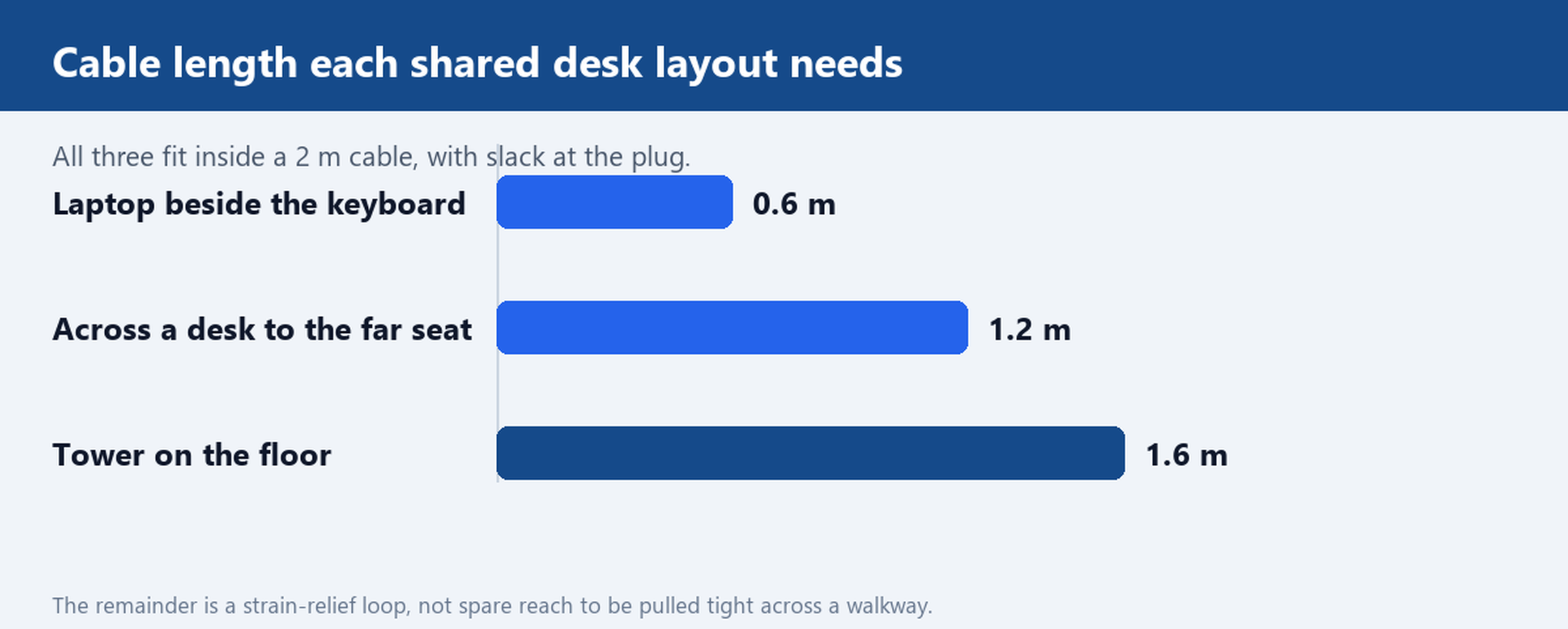
Cable length decides whether the unit reaches. A 2 m cable covers the layouts that matter:
- From a tower on the floor to a seated user, roughly 1.6 m of run, leaving slack for a strain-relief loop at the plug.
- Across a 1.2 m desk to a seat on the far side, which is the common shared-station layout in a computer room.
- From a laptop beside the keyboard, around 0.6 m, where the extra length is coiled and tied rather than left to catch a chair.
On-ear volume control is worth specifying for a shared desk because it moves the adjustment away from the software. A user who can mute and adjust without finding the right window is a user who does not pull the plug to silence the room. Confirm the control is on the cable rather than the ear cup, so it does not change the weight on one side of the head.
Incoming Checks on a Carton Before It Ships to Sites
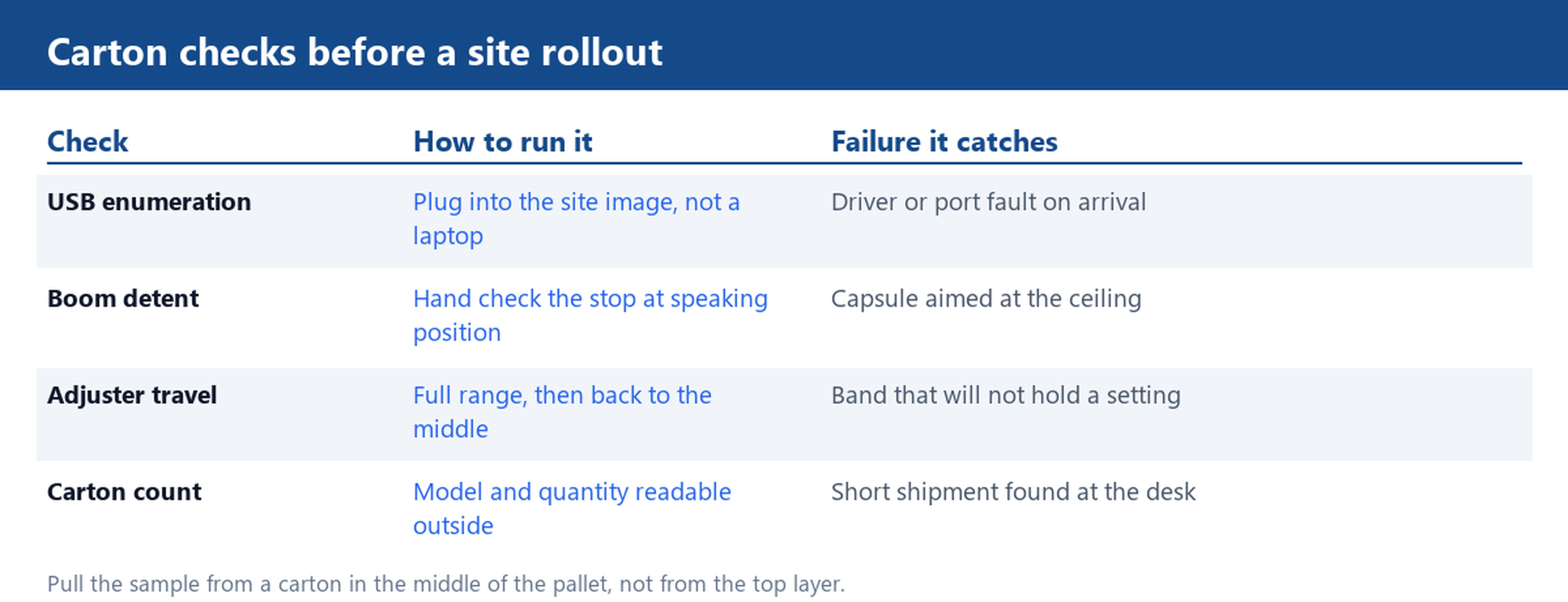
A site order is usually installed in one day, by people who are not the buyer. That makes the carton the last chance to catch a problem. Five checks, done on a pulled sample rather than on the first carton:
- Plug and cable continuity on every unit in the sample, with the unit plugged into a PC rather than a tester only.
- Boom detent at the speaking position, checked by hand on each unit for a firm stop.
- Adjuster travel through the full range, then returned to the middle setting before packing.
- Carton count and labelling matching the site list, with the model and quantity readable from outside the box.
- One spare per site packed in the same carton, because a single failed unit otherwise stops an installation.
For a mixed site, the same order can combine the headset with in-ear units for staff who prefer them, since both sit under audio and video on this site. The PC headset range lists the over-ear units with a boom, the gaming headphone is the reference for a padded band and a rotating boom, and the stereo gaming headset shows the same shell with a different cable termination. Buyers who need in-ear units for the same rollout will find them in the earphone range, which is where the clip and neckband formats sit.
Tell us the desk hardware and headcount per site, and we will send a sample headset plus the carton spec for a fit trial.
