

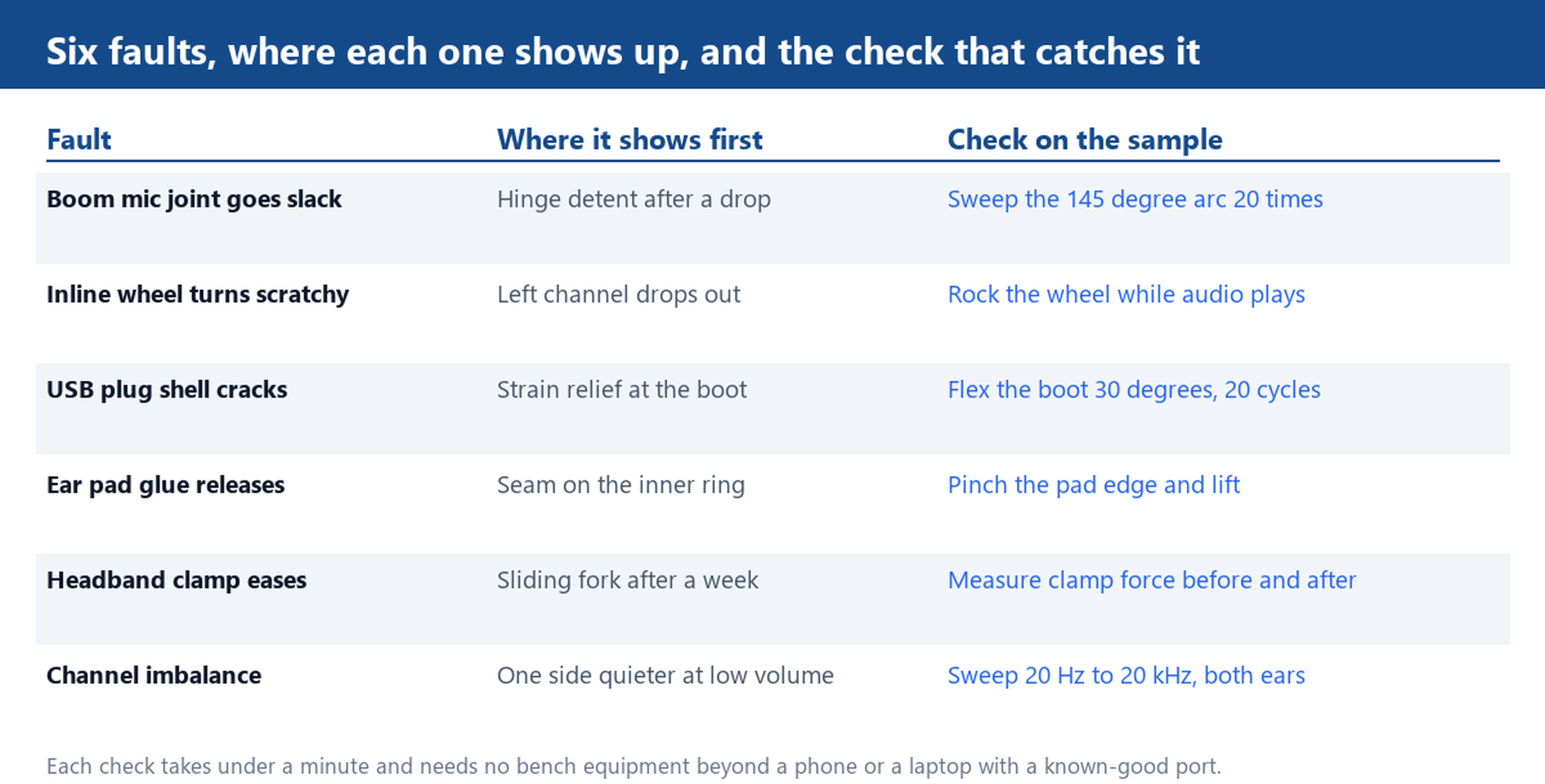
Most USB headset returns do not come from a dead driver. They come from six mechanical and contact faults that show up within the first weeks of use, and every one of them is visible on a sample before the carton is sealed. Anyone writing a purchase specification for pc headset common defects should start from that list rather than from the frequency response figure, because a headset that fails at the boom mic joint will be returned by the user long before anyone notices its audio band.
Boom Mic Joint: The 145 Degree Hinge and the Drop Test That Loosens It
The adjustable mic boom on this family of headsets is quoted as 145 degrees of travel. That arc is held by a detent, usually a pair of small ribs moulded into the fork, and the detent is the part that wears. A drop onto a desk edge loads the boom sideways, the ribs deform, and within a week the microphone will not hold the position the user set. The symptom is a mic that droops into the mouth during a call, which the user reads as a fault in the electronics.
The check takes under a minute: sweep the boom through its full arc twenty times by hand, then set it at three positions and see whether it holds each one against a light finger pressure. Do it on two units out of every carton opened, because detent wear is a moulding issue and it tends to appear across a whole production run rather than in single pieces. If the boom falls from the top position under its own weight, the detent depth is out of tolerance and the fix is at the tool, not at the assembly station.
Inline Volume Control: Scratchy Channels and the Wheel That Fails First
The inline control is a potentiometer with a wheel on it, and it sits on the cable where every pocket, drawer and chair leg can reach it. The scratch is a worn resistive track: as the wiper passes over a damaged track segment, the channel drops out or crackles. The stereo USB build quotes volume control as a feature, so the check has to confirm the control is clean across its whole rotation, not just at the two ends.
Play a steady tone or a familiar track at a low volume, then rock the wheel slowly through its full travel ten times. Listen for a dropout on one side, a crackle, or a point where the volume jumps rather than ramps. Then set the wheel at a mid position, hold the housing, and flex the cable entry on both sides of the control. A control whose cable gland is loose will fail at that gland within months, and the fault looks like a dead channel to the user.
USB Plug and the 2 m Cable: Strain Relief, Plug Shell and Contact Wobble
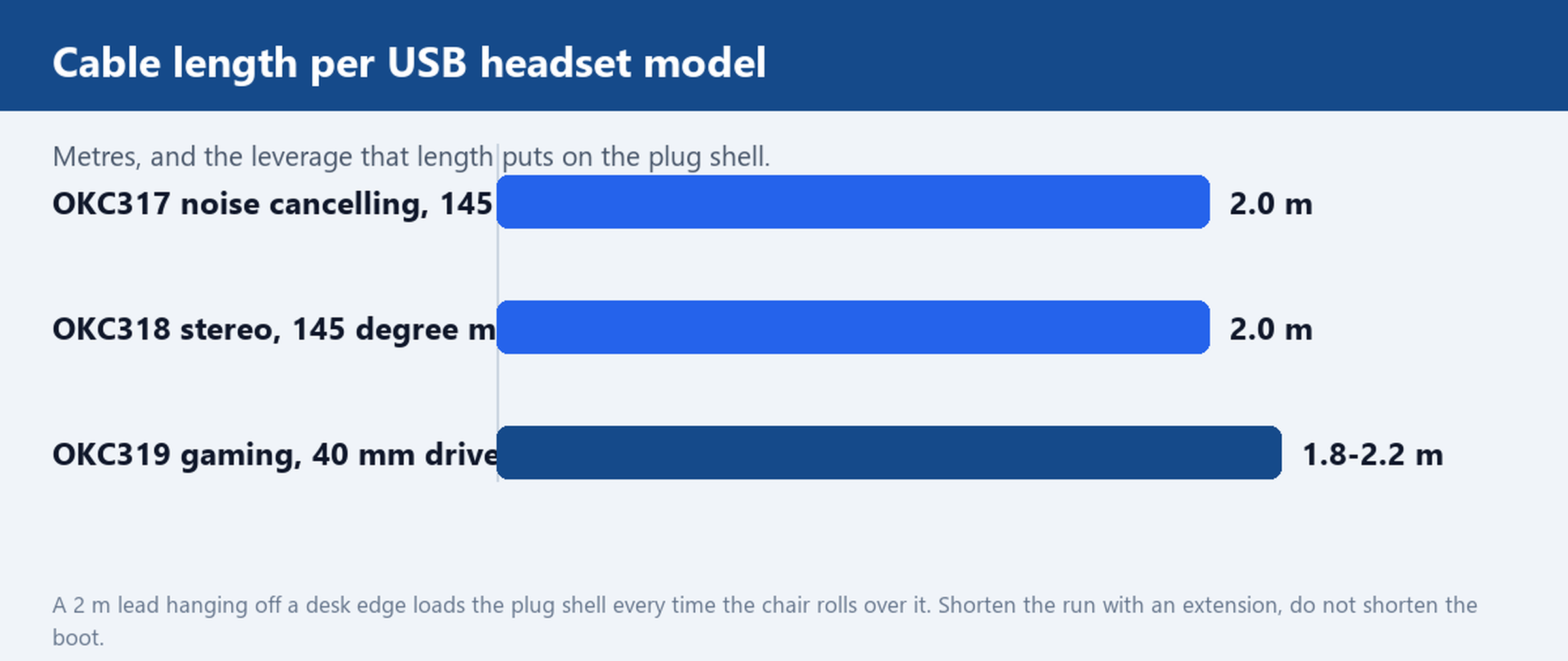
Cable length is the variable that decides how much abuse the plug takes. The noise cancelling build and the stereo build both quote a 2 m lead; the 40 mm gaming build is quoted at 1.8 m to 2.2 m. Two metres is long enough to hang off a desk edge and reach a chair caster, and every time the caster rolls over the lead the load lands on the plug shell and its boot.
So test the boot rather than the plug. Hold the plug body, flex the boot 30 degrees in each direction twenty times, then inspect the joint between boot and shell under a light for a white stress line. A stress line is the beginning of a split, and a split shell eventually lets the contacts move. Then seat the plug in a known-good port and rock it gently side to side while audio plays: a click, a dropout or a re-enumeration on the computer means the contact block is loose in the shell.
Ear Pads and Headband Clamp After a Season of Use
Ear pad glue is the least technical fault and the one users complain about most, because a pad that lifts at the seam changes how the headset feels rather than how it sounds. Pinch the pad edge and lift gently all the way round the inner ring; if the glue line separates at any point, the bond is marginal and the summer shipping temperature will finish it. Ask which adhesive is used and whether the pad is glued or clipped, because a clipped pad is a different repair path for the user.
Headband clamp is a wear item too. Measure the distance between the two ear cups before and after extending the sliders twenty times. A clamp that eases by more than a couple of millimetres will feel loose on the head within a season, and a loose clamp also drops the bass, because the pad no longer seals. On the PC headset range the sliders are the same moulding across several models, so one measurement covers the family.
Carton and Paperwork: Colour Box, CE and RoHS Marks and the Warranty Terms
Finish with the carton, because that is where a good unit still turns into a bad delivery. Check that the colour box carries the marks the destination market requires, that the CE and RoHS marks are printed rather than stickered over another brand, and that the model number on the box matches the model number on the headset. The 40 mm gaming build is quoted with CE and RoHS; the 2 m builds are quoted with a one-year warranty and a colour box, so confirm both in writing before the run starts.
Then confirm what the warranty actually covers. One year on the headset is standard, but the terms need to say whether the ear pads and the cable are included, because those two items carry most of the failures listed above. Ask for the incoming check sheet with the sample: if a supplier will not put the six checks in writing, the six faults are being managed after the fact rather than before it.
Request a sample headset and our incoming-check sheet before you place a bulk order.
