

A pc headset lifespan is rarely decided by the driver or the electronics. In a shared-desk or call-centre rollout, the parts that touch people fail first: cushion foam compresses, the headband loses its clamp, the 145-degree boom hinge loosens, the 2 m USB cable frays where it meets the plug, and the ABS shell cracks at the yoke. This guide walks through those five failure points in the order a buyer should audit them, and it shows how to read a one-year warranty against the number of shift hours a headset actually sees. The aim is a replacement budget you can defend at renewal time, not a figure copied from a catalogue. 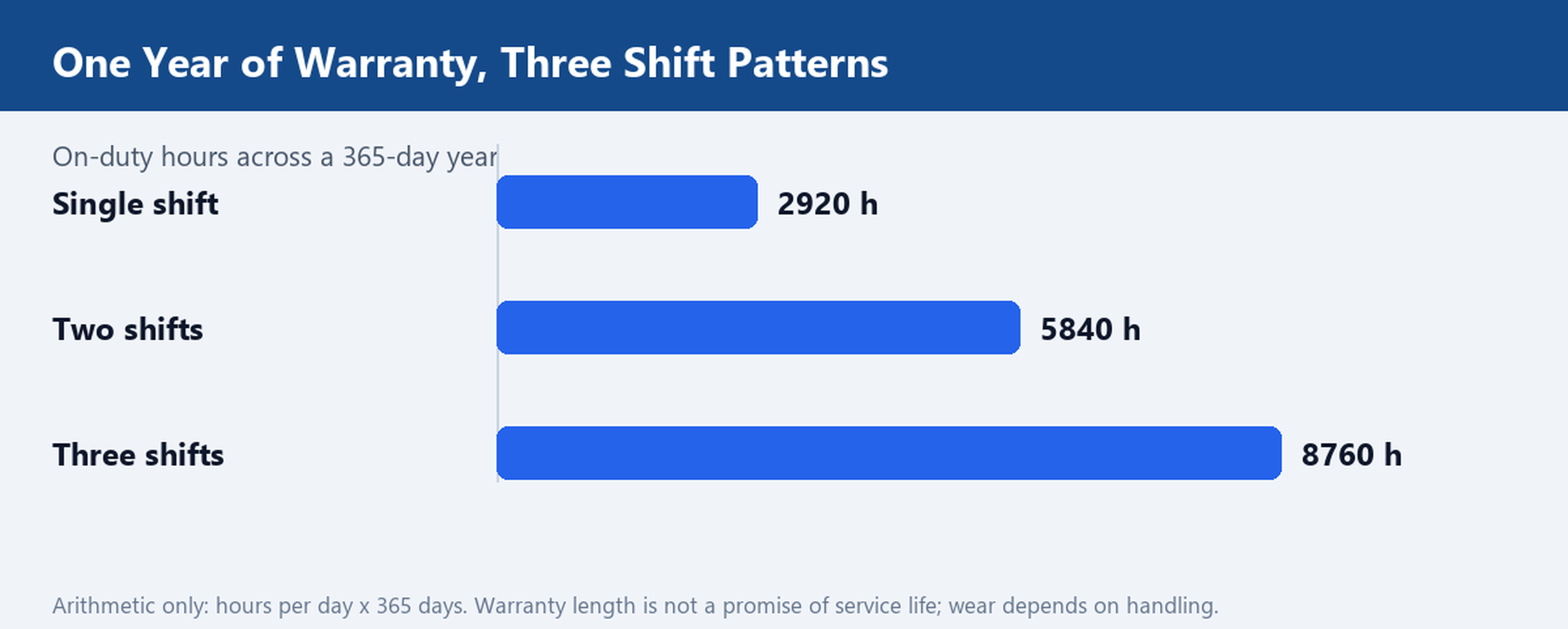
Which Part Sets the Replacement Cycle
Ask a purchasing team what shortens a pc headset lifespan and the answers are usually vague. The useful way to answer is to separate the parts that wear from the parts that do not. The driver, the USB control box and the printed circuit board rarely cause a unit to be pulled from service in a normal office or support floor. What fails is the interface between the headset and the person wearing it, plus the flexible link back to the computer.
That distinction matters because wear items can be stocked and swapped, while a failed board usually means the whole unit is retired. If a supplier can sell replacement pads, a replacement boom and a replacement cable, a single headset can stay in service across more than one user cycle. Start the audit by listing which of those consumables are available, and at what lead time, before comparing the headline price of two models in this PC headset range.
Ear Cushion Foam and Headband Clamp Force
Cushion foam is normally the first thing to go. Daily compression breaks down the cell structure, the leatherette skin splits at the seam, and the pad stops sealing around the ear. Once the seal is gone, background noise leaks in and the user turns the volume up to compensate, which is when a comfortable headset starts to feel like a problem. There is no fixed month at which this happens: it tracks hours of wear and how roughly the headset is put down. A buyer should treat pads as a consumable and ask for a per-seat spare ratio.
The headband is the slow companion to the same problem. Clamp force comes from the band and the sliders; over time the plastic relaxes and the headset starts to slide on a smaller head or sit loose during a call. The check is simple and belongs in a first-article inspection: put the sample on a form, tilt it, and confirm it stays put without pressing. If two samples from the same box behave differently, the moulding tolerance is the issue, not the user. Ask the factory what clamp force it targets and whether the sliders are metal or plastic, then record the answer for the next order.
The 145-Degree Boom Joint and the Volume Dial
The boom microphone is the most moved part of a headset. A 145-degree hinge lets a user park the mic out of the way and swing it back to the corner of the mouth, and every swing is a cycle on the joint. Looseness shows up as a mic that drifts mid-call or a click when the arm is adjusted. When specifying a model, ask how the hinge is built, whether it is a friction fit or a detent, and what the quoted rotation range actually is. A number printed in a listing is not the same as a joint that holds its position after a few hundred adjustments.
The inline volume dial and mute control sit on the same cable and take the same repeated handling. A dial that feels gritty on day one will not improve with use. Check it during sampling by cycling it through its range and listening for crackle in the line. For a pc headset lifespan measured in years, these small mechanical parts are often the limiting item, well before the driver or the electronics give any sign of trouble.
USB Cable Failure at the 2 m Strain Point
Cable failures cluster at the two ends, and the plug end is the usual suspect. A 2 m lead gives a desk user enough freedom to reach a tower or a dock, but that length also means the cable trails across the floor and gets caught on chair legs. The strain relief where the jacket meets the USB connector takes that load. When it gives, the symptom is a connection that cuts out unless the plug is held at a particular angle, which users often misread as a computer fault.
Ask two questions before ordering: what jacket material is specified, and how the strain relief is formed. A longer boot that tapers into the cable generally survives repeated bending better than a hard right angle. That question belongs beside the same check on the computer and desk audio lines, since the cable is the shared weak point. 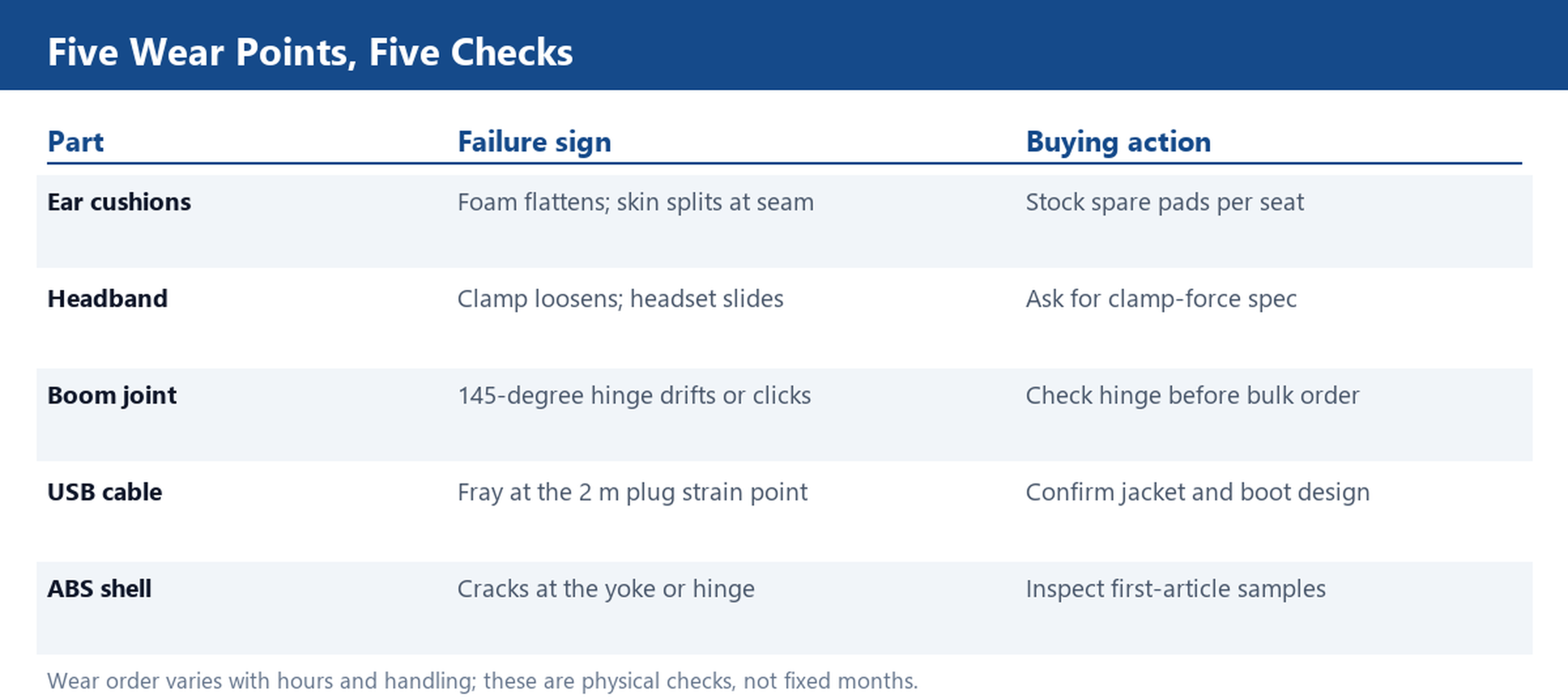
Reading the 1-Year Warranty Against Real Shift Hours
A one-year warranty reads generously on a spec sheet, but it describes a period on the calendar, not a number of working hours. A headset on a single eight-hour shift sees a very different load from one passed between three shifts on the same desk. To make the number useful, convert it: one shift a day over a 365-day year is about 2,920 on-duty hours, two shifts about 5,840, and continuous three-shift use about 8,760. Those figures are simple arithmetic, not a service-life promise; actual wear still depends on handling and fit.
What the warranty covers is the more important question. Many policies treat cushion foam and cable damage as consumables or misuse, so the parts most likely to fail may sit outside the claim. Ask the supplier to state in writing which components are covered, how a claim is filed, and whether spares can be bought separately at a known price. Read that answer beside the shift conversion above and the pc headset lifespan becomes a cost per hour you can compare between bids, rather than a warranty length that looks identical on every quote.
Tell us the shift pattern and the headcount, and we will send the cushion and cable spare-part list together with a sample headset, so you can test the hinge, clamp and strain relief before you commit the order.
