

A smart watch for fitness is judged on three lines of a spec sheet, and most sheets make all three hard to read. The heart-rate sensor and the pedometer are often described as one feature when they are two separate jobs. Built-in GPS is listed next to Bluetooth as if the two were the same kind of connection. Runtime is printed as a standby figure that assumes the radio is asleep. For a buyer filling a sports shelf, these three lines decide whether the watch survives a workout and a return window.
Short version: ask which sensor drives step count and whether heart rate is optical or inferred; require built-in GPS if the watch must track a run without a phone; and treat the standby figure as an upper bound, then check what happens with GPS active. The arithmetic behind the battery line is below.
HR Monitor and Pedometer: Two Sensors, Not One Feature Line
Step counting and heart-rate reading are different measurements and usually different parts. A pedometer is an accelerometer: it counts motion patterns that look like steps, and it works without any contact with the skin. Optical heart rate uses a green light and a photodiode on the back of the case, and it needs a snug fit to read the pulse in the wrist. A sheet that lists both under one heading tells you nothing about which one is actually fitted, so ask for the component list rather than reading the marketing line.
The distinction matters on the shelf. A watch with an accelerometer but no optical sensor can still count a run accurately, but it cannot give a training heart-rate zone. A watch with an optical sensor that is loose on the wrist gives a plausible number that drifts during exercise. For a fitness channel, specify both functions separately in the brief and test them on the same wearer: walk a known distance for the step count, then compare the heart-rate reading against a chest strap during a steady effort. Our smart watch range lists the sensor configuration per model, which is the right place to start the shortlist.
Built-In GPS or Tethered: What Fitness Tracking Needs From the Watch
GPS is the line that separates a fitness watch from a notification watch. A tethered unit uses the phone GPS and draws the route on the phone screen; it is lighter and cheaper, and it stops working as a standalone tracker the moment the phone is left behind. A watch with built-in GPS fixes its own position and records a run, a ride or a walk with only the watch carried. For a buyer whose customers run with a phone, the tethered model is adequate. For anyone who wants to travel light, built-in GPS is the requirement.
The cost is power, and it shows up immediately in the runtime line. A GPS chip listening for satellites draws far more than the standby load, so a watch that lasts days in standby may last a single long session with navigation active. This is the reason to read the GPS and the battery lines together instead of separately. When a supplier quotes 48-hour standby and built-in GPS in the same breath, ask for a separate navigation runtime, not the standby figure repackaged.
480 mAh, 48 Hours Standby and 3 Hours Talk: Reading Runtime Honestly
Convert the battery figure before trusting the hours. A 480 mAh pack at 3.7 V holds about 1.78 Wh. A 48-hour standby claim implies an average draw near 37 mW, which is plausible only when the screen is off and the radios are idle. Three hours of talk implies a very different load, near 600 mW at the same cell voltage. Both figures can be true; they describe opposite use patterns and should never be presented as one battery life.
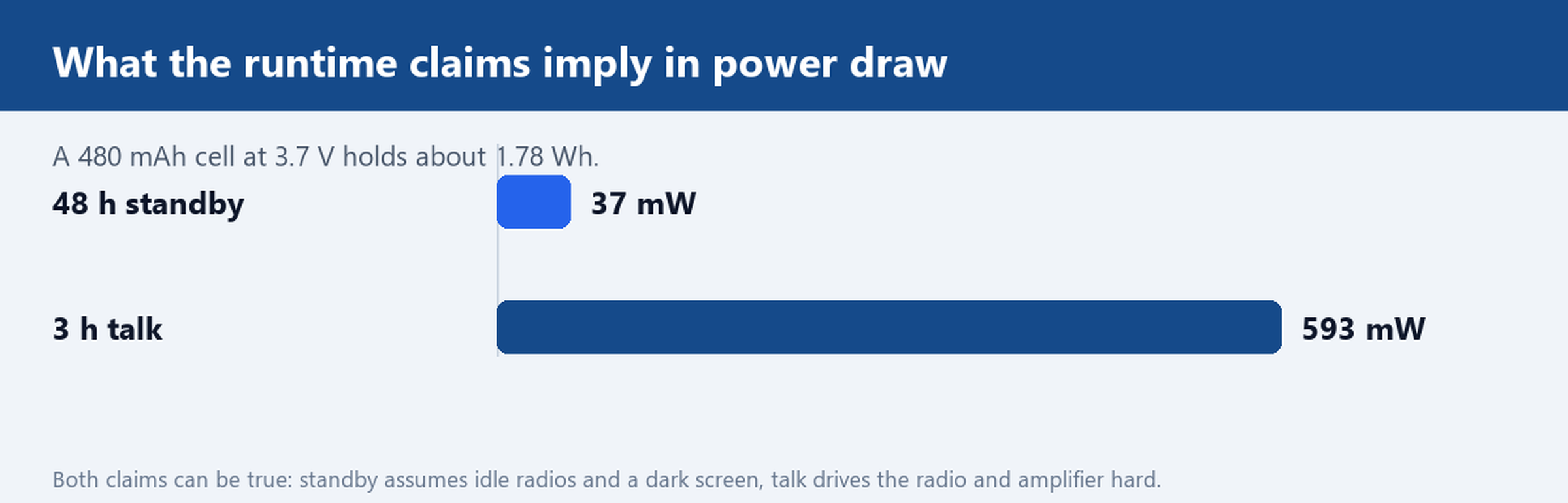
The number a fitness customer will actually see is the GPS session. With the screen on and the GPS fix held, the draw sits between the standby and talk cases, closer to the talk side. That puts a 1.78 Wh cell in the range of a long workout or a few hours of continuous tracking, not a full day of navigation. Give the buyer an honest session figure and a separate standby figure on the same line, and the return rate drops because the expectation matches the use.
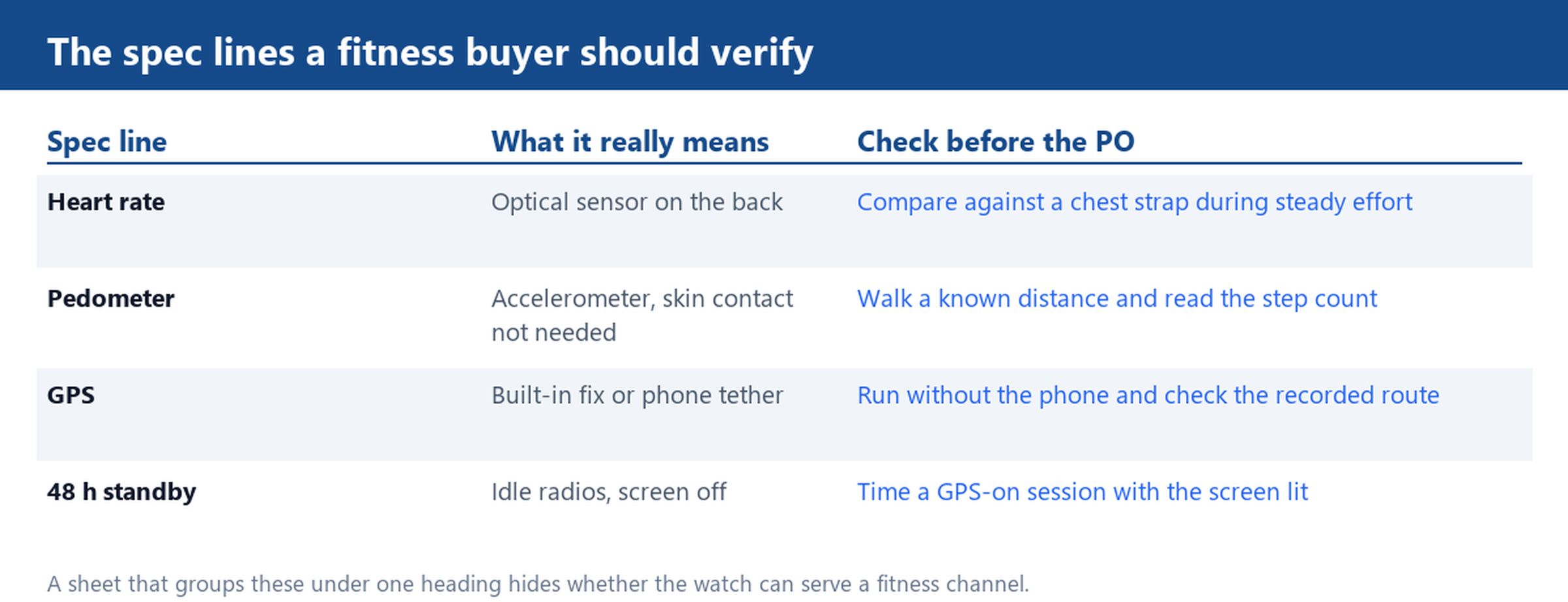
A practical check before a retail order: charge the sample fully, start a GPS session with the screen on, and record how long the watch lasts until it shuts down. Repeat with the screen off but GPS still active. The gap between the two tells you how much of the runtime the display consumes, which is the lever a firmware team can actually pull. Put the measured session time in the product brief rather than copying the standby claim.
Strap, Case Size and the IP Rating to Ask For Before a Retail PO
A fitness watch is worn during sweat and rain, so the ingress rating is a purchase criterion, not a detail. Ask for the stated IP level and what the test covered: a splash rating protects against rain and hand washing, while a higher rating is needed for a wet workout or a swim. Match the claim to the channel. A walking and running shelf needs splash protection; a swim or outdoor channel needs more, and the supplier should state the depth and duration rather than a bare number.
Case size and strap matter just as much. A large round case reads well in a catalog but sits badly on a small wrist, and a hard strap chafes during a long session. Specify the lug width, the strap material and the adjustment range in the sample brief, and check that the watch can be worn snug enough for the optical sensor to read without cutting off circulation. A phone accessories range often shares the same retail shelf, so the packaging and the display footprint should be planned alongside it.
Kids and SIM Models: When a Fitness Buyer Should Skip Them
Not every watch in the catalog belongs on a fitness shelf. A 3G SIM model with a phone function adds a radio, a subscriber requirement and a monthly plan question that a sports customer did not ask. A kids model is built around location and calling, with a smaller battery and a different strap, and its brain is the parent phone rather than a training log. Both can be good products in their own aisle, but they complicate a fitness return policy because the buyer expects tracking that the firmware is not built to provide.
For a fitness channel, keep the shortlist to watches that pair for data, count steps from an accelerometer, read heart rate optically and, where the price allows, fix position with their own GPS. Ask the supplier to separate the two sensor functions on the sheet, give a GPS-on session time next to the standby figure, and state the ingress rating with its test conditions. Send your fitness channel spec sheet for a sample watch and a quote, and we will confirm which of those lines the sample can actually meet.
