

A commuter buyer asks whether the earphone is comfortable for an hour. A gaming buyer asks whether the team can hear them, and those are different questions about the same product. The changes that turn a commuter model into an earphone for gaming are concentrated in three places: the plug wiring, the microphone position and the cable, and none of them shows up in a photograph. This guide covers what to change, how to test it on a sample, and which of the three is worth the tooling money.
What a Gaming Buyer Asks For That a Commuter Buyer Does Not
A commuter earphone is judged on fit, isolation and how it behaves on a train. A gaming earphone is judged on the return path: whether the microphone picks up speech clearly, whether the cable transmits handling noise into the ear, and whether the plug actually works with the host the buyer plays on. The first is a comfort question, the second is an acoustics question, and the third is a wiring question that fails silently.
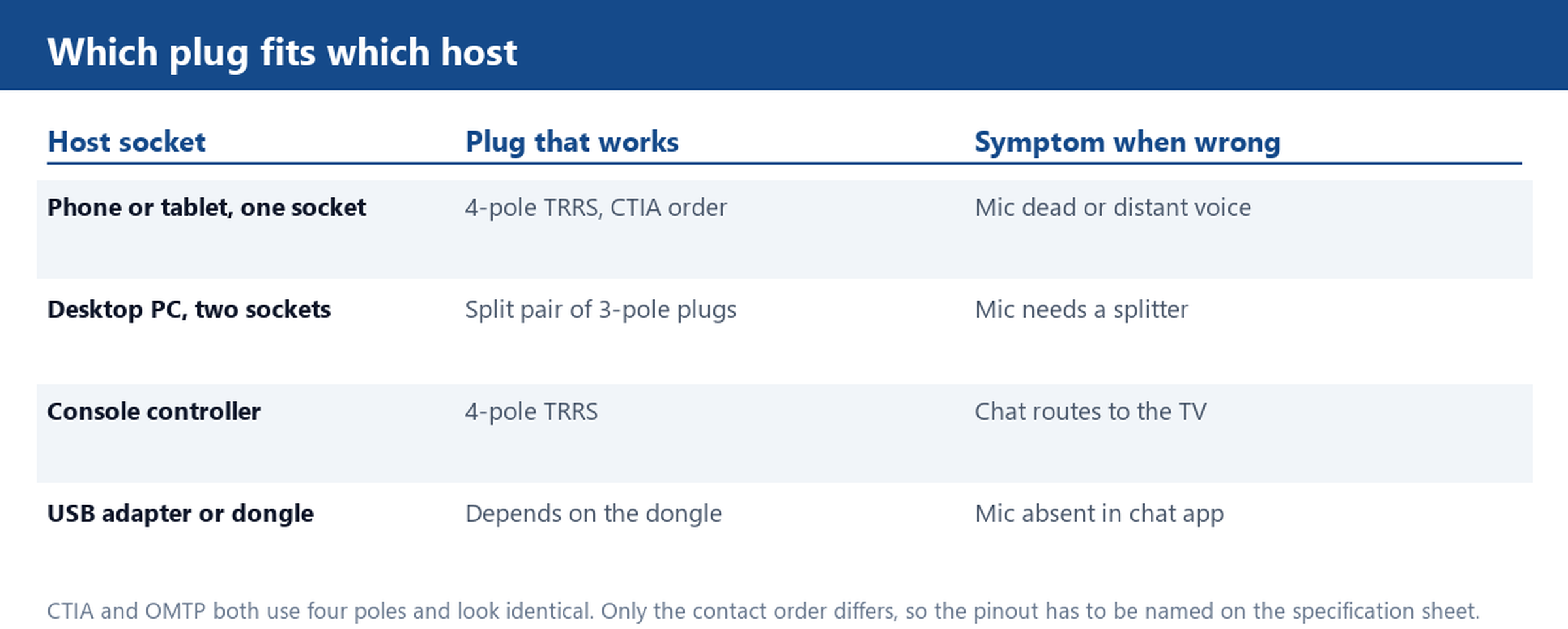
That third one causes most of the returns, because it looks like a quality problem and is really a specification problem. A four-pole plug wired to one pinout will put the microphone on the wrong contact in a host wired to the other, and the result is either no microphone at all or a hollow, distant voice with the game audio bleeding into the chat. The user blames the headset. The factory shipped exactly what the order said.
So the first thing to settle with a gaming buyer is not the driver or the colour. It is the host list: phone, tablet, PC with a combo jack, PC with separate jacks, handheld console, or a controller with its own socket. That list decides the plug, and the plug decides whether the rest of the changes matter.
4-Pole TRRS vs Split Mic and Headphone Plugs
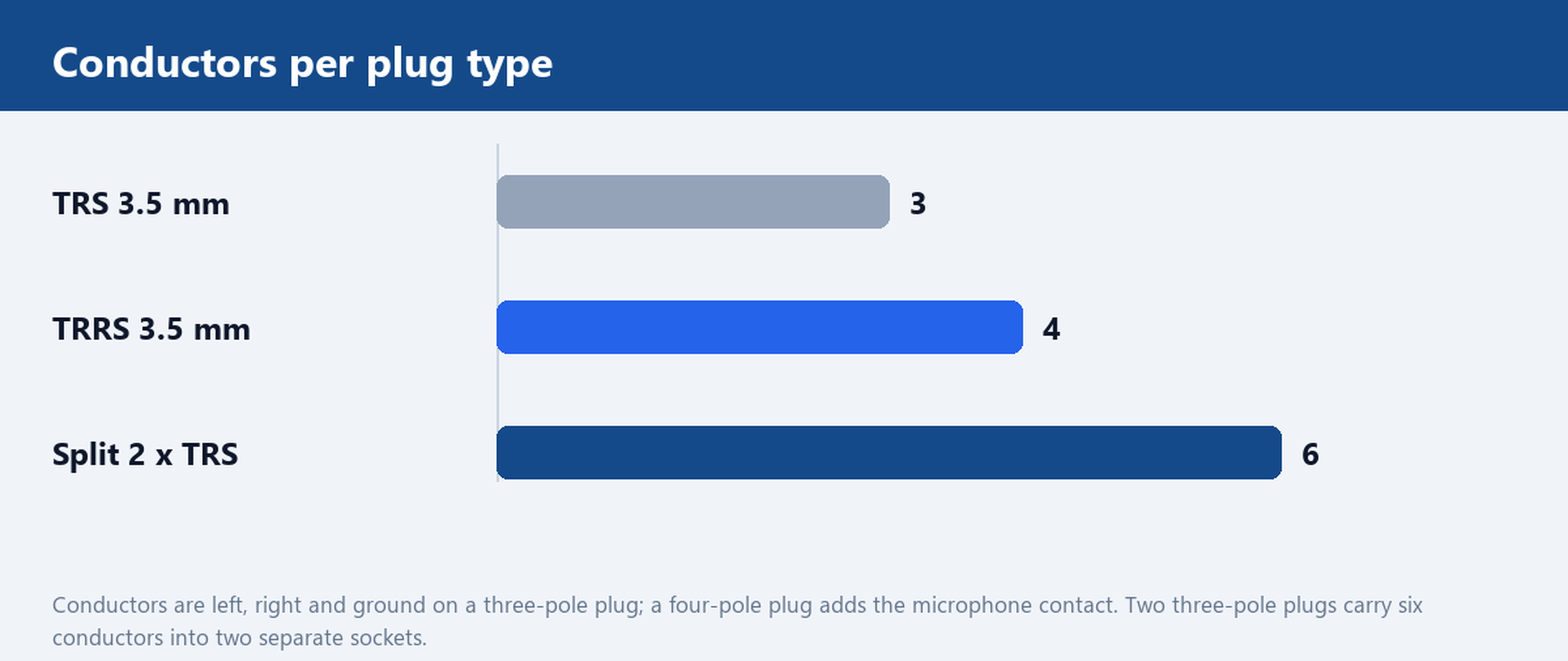
A three-pole plug carries left, right and ground. A four-pole plug adds a fourth contact for the microphone, and the order of those four contacts is where the trouble lives. In the common CTIA arrangement the sleeve is the microphone and the second ring is ground. In the older OMTP arrangement those two are swapped. Both are four-pole plugs, both look identical from outside, and plugging one into a host wired for the other produces exactly the symptom described above.
A split solution avoids the argument entirely: two three-pole plugs, one for the headphones and one for the microphone, each into its own socket. That is the correct answer for a desktop PC with separate pink and green jacks, and it is the wrong answer for a phone, a tablet or a modern laptop with a single combo socket, where the user needs a splitter dongle to make it work at all.
For a resale programme, the practical answer is usually one four-pole plug built to the CTIA order, plus a short splitter in the box for desktop users. The splitter costs less than a second cable assembly, and it removes the support call from the buyer rather than from the end user. Our earphone range lists the pinout per model, and the in-line microphone model is the shape most gaming enquiries start from.
Inline Mic Position and a Voice-Chat Test You Can Repeat
Position decides more about perceived microphone quality than the capsule does. An inline module sits on the cable, usually a hand span below the chin, so it picks up speech at an angle and picks up the jacket zip, the desk edge and the cable itself at the same time. Moving the module a few centimetres up the cable, or adding a small clip, changes the recording more than swapping to a more expensive capsule.
Test it the way the buyer will use it. Record a fixed passage at a fixed distance on three samples, using the same host and the same chat application, then listen back on the same headphones. What you are listening for is not warmth or tone; it is whether the voice sits clearly above the room, whether consonants survive, and whether there is a rumble or a hiss under the speech. Three samples is enough to see the spread, and the spread is what a bulk lot will deliver.
Repeat the test with the game audio running, because that is the real condition. A capsule that sounds clean on its own can pick up output from the earpieces through the shell, which the team hears as an echo of their own game. If that appears, the fix is mechanical: decouple the module from the shell, or move it further down the cable.
Cable Noise, Ear Tips and Comfort Over a Long Session
Cable noise is the sound of the cable touching something, transmitted up the conductors and into the ear. It is the single most common complaint from players who move their head, and it is cheap to test: with the earphones in and the game silent, rub the cable between two fingers from the plug up to the splitter, then let it drag across a sleeve. Any rustle that arrives louder than the music is cable noise, and it will be worse on a stiff jacket than on a soft one.
Two design choices reduce it. A softer jacket compound absorbs the vibration instead of conducting it, and a shorter run above the splitter means less cable to brush against. Both cost less than a driver change and both are visible in a sample review within a minute, which makes this the first thing to check when a candidate model is shortlisted.
Comfort over a long session is the other half. Gaming sessions run for hours, so an ear tip that feels acceptable for ten minutes can be unbearable at ninety. Ask for the tip assortment that will ship, test with the medium tip on at least two people, and check whether the housing presses on the ear when the head is turned. A housing that is slightly smaller than the commuter version is often enough.
What to Change on a Commuter Model to Sell It as Gaming
Four changes cover most of the gap, in ascending order of cost. First, confirm the four-pole pinout and state it on the specification sheet. Second, move or clip the inline module so it sits closer to the mouth and further from the jacket. Third, soften the jacket or shorten the upper cable run to cut handling noise. Fourth, add the splitter to the box for desktop users.
What does not need to change is the driver, the housing or the colourway, and that is the commercial point: a commuter platform can serve a gaming programme without new tooling, as long as the plug and the microphone are specified properly. Buyers who spend the tooling budget on a light ring and skip the pinout usually end up with a product that photographs well and returns badly.
Two lines on the purchase order protect the lot. State the pinout by name and require the factory to test every unit for microphone continuity, not a sample. Then require the splitter to be packed and counted per carton, because a missing accessory is a return that costs more than the accessory.
Send the commuter model you already sell and the platforms your buyers play on, and we will quote a 4-pole TRRS version with the mic and cable changes marked on the sample. The PC headset range covers the split-plug desktop case, the audio and video index groups the related models, and the mobile phone accessories category is where the adapters and splitters sit.
